
Customizing Auth0 with Actions and Triggers
Auth0 provides several extensibility features that allow developers to customize authentication and authorization workflows without modifying the core identity platform. Among these, Actions and Triggers offer a powerful and flexible mechanism for injecting custom business logic into the authentication pipeline.
In this article, we’ll explore how Actions and Triggers work together and implement a practical example that restricts access to an application during weekends.
Understanding Actions and Triggers
Auth0 follows a simple event-driven model for extending authentication flows.
- Trigger – Defines when custom logic should execute during the authentication lifecycle.
- Action – Contains the custom Node.js code that executes when a trigger fires.
Conceptually, the authentication flow looks like this:
User Login
     │
     ▼
Post Login Trigger
     │
     ▼
Custom Action Executes
     │
     ▼
Allow or Deny Login
     │
     ▼
Issue Tokens
One of the most commonly used triggers is:
- Post Login – Executes immediately after a successful user authentication and before tokens are issued.
Use Case
Assume you have an OIDC web application configured in Auth0 named:
custom-clientThe business requirement is:
Allow users to access this application only on weekdays (Monday through Friday). Login attempts during weekends should be denied.
Step 1 – Create a Custom Action
Navigate to:
Actions → Library → Create Action → Build from ScratchProvide:
- Name:
CustomAction - Trigger: Post Login
Auth0 generates the following template:
/**
 * Handler executed during the Post Login flow.
 *
 * @param {Event} event
 * @param {PostLoginAPI} api
 */
exports.onExecutePostLogin = async (event, api) => {

};
Step 2 – Implement the Business Logic
Modify the generated function as shown below.
exports.onExecutePostLogin = async (event, api) => {

  if (event.client.name === "custom-client") {

    const day = new Date().getDay();

    // Sunday = 0
    // Saturday = 6

    if (day === 0 || day === 6) {
      api.access.deny(
        "This application is available only during weekdays."
      );
    }

  }

};
Code Explanation
The Action performs the following checks:
- Verifies that the login request is for the application
custom-client. - Determines the current day of the week.
- Denies authentication on Saturdays and Sundays.
The following API is responsible for denying access:
api.access.deny("This application is available only during weekdays.");After updating the Action:
- Click Save.
- Click Deploy.
Step 3 – Attach the Action to the Trigger
Creating an Action alone is not sufficient.
It must be attached to the authentication flow.
Navigate to:
Actions → Triggers → Post LoginThen:
- Drag your Action into the flow.
- Click Apply.
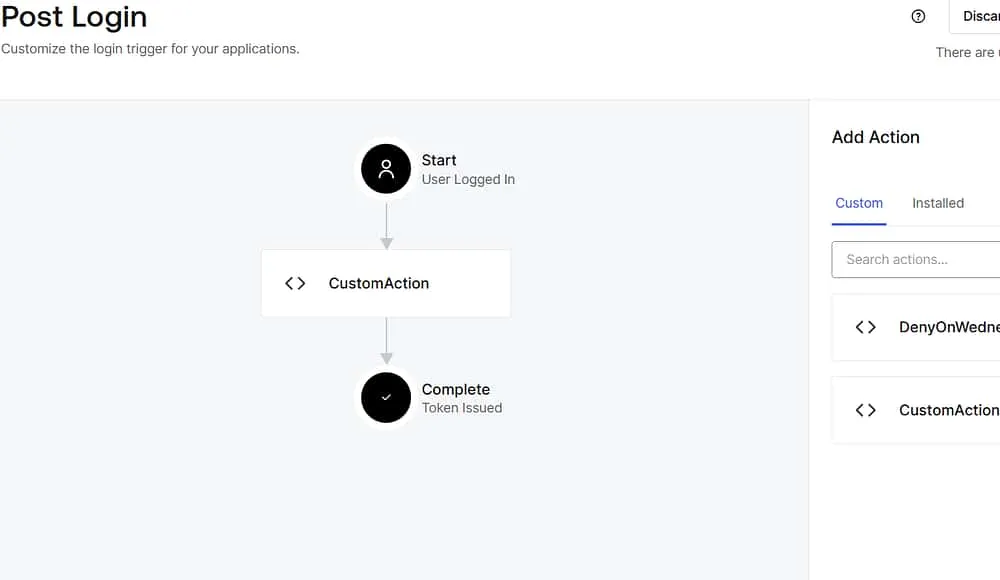
Screenshot: Auth0 Post Login Trigger with the custom Action.
Once configured, the Action executes after every successful authentication.
Step 4 – Test the Implementation
Launch the application and authenticate through Auth0.
Expected behavior:
| Day | Result |
|---|---|
| Monday – Friday | Login succeeds |
| Saturday | Login denied |
| Sunday | Login denied |
Users attempting to authenticate during weekends receive the custom error message configured in the Action.
Monitoring and Debugging
Authentication activity can be monitored from:
Monitoring → LogsThe logs help verify:
- Whether the Action executed.
- Whether authentication was allowed or denied.
- Any runtime errors encountered during execution.
Extending the Solution
This example demonstrates a simple business rule, but Auth0 Actions support much more sophisticated scenarios.
Some common use cases include:
- Adding custom claims to ID or Access Tokens.
- Looking up user information from external APIs.
- Sending notifications (for example, Slack or Microsoft Teams).
- Recording audit information.
- Enforcing organization-specific login policies.
- Applying conditional access rules.
Best Practices
When developing Auth0 Actions:
- Keep Actions lightweight and responsive.
- Avoid long-running API calls.
- Handle external service failures gracefully.
- Use secrets for sensitive configuration instead of hardcoding values.
- Test changes in a development tenant before deploying to production.
Summary
Auth0 Actions and Triggers provide a clean and powerful way to customize authentication flows without modifying your applications.
In this article, we explored:
- How Triggers determine when custom logic executes.
- How Actions define what logic is executed.
- How the Post Login Trigger can enforce application-specific business rules before tokens are issued.
With just a few lines of Node.js code, we implemented a practical policy that restricts application access to weekdays, demonstrating the flexibility of Auth0’s extensibility model.
As your identity requirements evolve, Actions can be extended to implement sophisticated authentication, authorization, and token customization scenarios while keeping your applications simple and your business logic centralized.